In the fast-paced world of cryptocurrency, price moves can be sudden and significant. Whether you’re a long-term holder or a short-term trader, having access to crypto price alerts can give you the edge you need. Bitcoin may be the most well-known, but serious investors are also tracking Ethereum, Solana, XRP, and other popular cryptocurrencies, and Finbotica helps you stay on top of them all.
Why Bitcoin Still Leads the Market
Bitcoin continues to dominate the crypto space with its limited 21 million coin supply, growing institutional adoption, and reputation as “digital gold.” Investors have historically profited by buying during market dips and holding through halving cycles and macro-driven rallies. But Bitcoin’s volatility means timing is everything, and missing a breakout or breakdown can mean a missed opportunity or increased risk.
Crypto as a Strategic Hedge
Bitcoin and other cryptocurrencies, such as Ethereum and Solana, are also increasingly used as hedges against inflation, fiat devaluation, and even systemic uncertainty. While crypto doesn’t always behave like traditional safe havens, it offers diversification benefits in a portfolio, particularly when combined with proper timing and risk management.
Set Crypto Price Alerts
To successfully navigate the crypto markets, investors need real-time awareness. That’s where crypto price alerts from Finbotica come in. Finbotica supports all major cryptocurrencies, including Bitcoin, Ethereum, Solana, XRP, and many more.
You can create personalized email alerts (and SMS alerts) for any tracked coin, based on:
-
- Specific price targets (e.g., “Alert me when Ethereum drops below $3,000”)
-
- Percentage changes
-
- Custom technical thresholds
How to Create a Crypto Price Alert
Setting up alerts in Finbotica is quick, but each step matters. To make it easier to choose the right options, here’s a clearer breakdown of how the alert setup works.
-
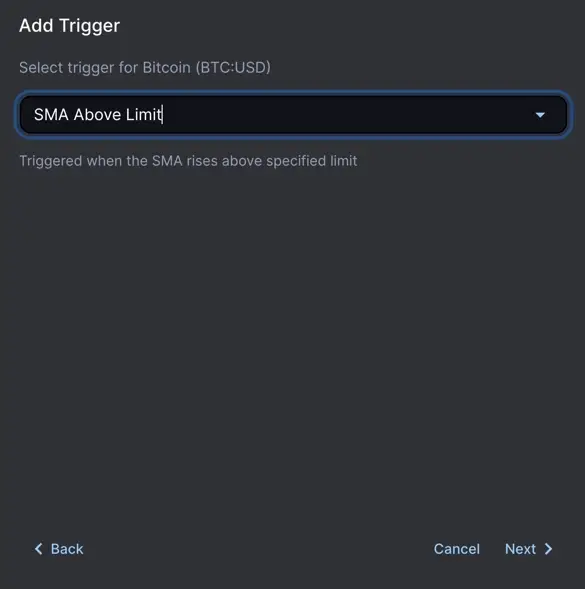
- Step 1 – Select the trigger event type. Select what should activate your alert.
For example:
-
Price reaches a specific level (above or below a target price).
-
Percentage change (e.g., +5% or -10% move).
-
Technical indicator signal (e.g., moving average crossover).
- Step 1 – Select the trigger event type. Select what should activate your alert.
-
- Step 2 – Enter the condition and select the frequency. Specify the exact rule for the alert:
- Set your price, percentage, or indicator threshold.
- Choose how often it should be checked (real-time, hourly, daily, etc.).
-
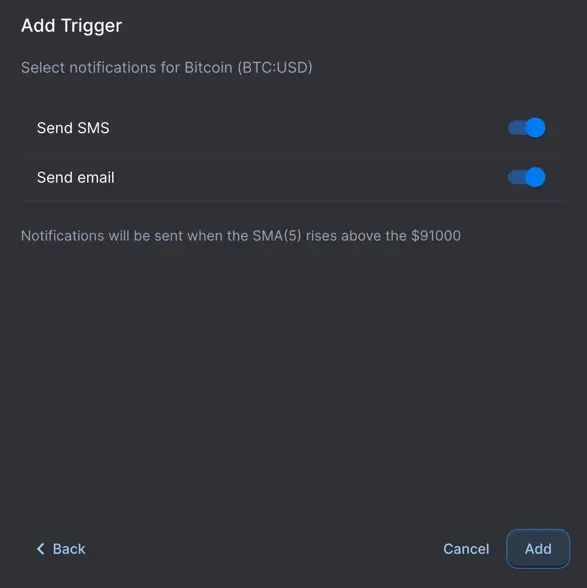
- Step 3 – Select notification preferences. Decide how you want to be notified:
- Email alerts.
- SMS alerts.
- Both (recommended for active monitoring).

For additional details on creating customizable stock alerts in Finbotica, see the Triggers Overview in the product documentation.